
null

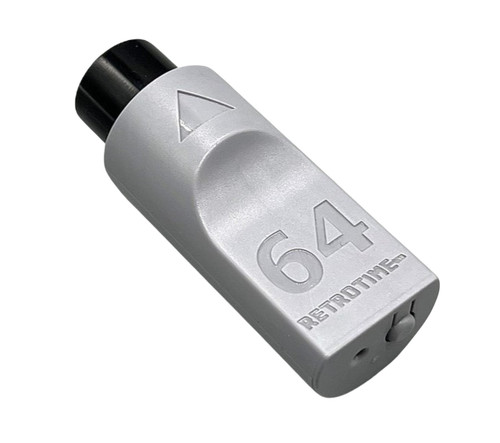
RetroTime DC BlueRetro Adapter for Sega Dreamcast

€30.09
(13 reviews) Write a Review
WIN $100 FOR WRITING A REVIEW! LEARN MORE
SKU:
SAGRTDCBT
RetroTime DC BlueRetro Adapter for Sega Dreamcast

ABOUT THIS PRODUCT

Did you ever want to play your Dreamcast games with a wireless controller, but couldn't find a viable solution?
You don't need to wait any longer!

The DC BlueRetro Controller Adapter is a an adapter for the SEGA Dreamcast that allows you to connect bluetooth controllers like the PS4, PS5, XBOX, Nintendo Switch, 8BitDo gamepads and most other BT based controllers.

Not only that, but it also adds a virtual memory card for your saves, that you can download and backup through its web interface! It can also support a rumble pak, if your controller supports rumble!

Features:

  • Re-mappable buttons
  • Easy to use web interface
  • Over the Air firmware updates
  • Plug & Play
  • Rumble and memory pak support* (virtual only - no VMU support)
  • Save memory capacity equivalent to 1 VMU (200 blocks). 

Pairing Process:

  1. Plug the adapter into your Dreamcast console.
  2. The LED will start to flash, this indicates pairing mode is active.
  3. Pair the controller of your choice
  4. After the controller is paired, it will automatically connect after a button press from now on

Button functions:

Short press (outside BT inquiry mode): Disconnect all Bluetooth devices from the adapter.
Short press (BT inquiry mode): Cancel Bluetooth pairing mode.
3 second hold: Enable Bluetooth pairing mode (new pairing).
10 sec hold: Factory resets the adapter to default configuration and clears BT pairing keys.

LED Status:

Solid: An error occurred, try shutting off your console and re-plug the adaptor.
Pulsing: Bluetooth pairing mode active (pairing).
Off: No errors, Bluetooth pairing mode disabled, controller connected.

Web Config Information:

Web Config is only available if no controller is connected. Supported only in Desktop or Android Chrome.

How to access the Web Config:

Power on system and connect via Web Bluetooth at BlueRetro Config to configure adapter. Button remapping and preset instructions can be found here.

Updating firmware via Web Config (OTA FW update):

Download the latest firmware from the BlueRetro GitHub page. Unzip the firmware file. Open a tab/window in your web browser and navigate to Blueretro Update Click “Connect BlueRetro” button. Select the “BlueRetro_dc_spiffs.bin” from the unzipped firmware folder. The “Live Output” will scroll through with the update process. On a PC, the update can take around 5 minutes. On Android, the update can take significantly longer.

This adapter is made possible by the amazing Blueretro open project by Darthcloud: GitHub 

*must be enabled in blueretro config.  Does not support VMU's and does not include a VMU style display.  Capable of rumble support for controllers that support it.  

Videos

13 Reviews

  • 5
    DC Adapter

    Posted by Pris M on Jun 1st 2026

    The adapter is great. It takes a bit of time to set up if you want to remap controllers that aren`t listed in the main setup menu, but once you figure it out, it works really well. I just finished setting up an 8BitDo N64 controller, and it works great with all games. The VMU integration is excellent as well. Just make sure to enable it in the settings (BlueRetro settings menu on the browser) and format it from the Dreamcast menu before using it. Otherwise, you`ll get an error when trying to save games. Shipping was fast, as usual. Stone Age is my go to source for this type of adapter and other retro gaming stuff. Thank you!

  • 4
    Works great, bit finicky

    Posted by Kirkland on May 29th 2026

    Works as advertised although getting the memory card takes some manual setup but nothing too challenging. I find it has pretty short range though, maybe 6-8 feet at most? I`ve never had an issue with wireless controller length so that stuck out to me when it stopped reading button presses after I sat far enough away.

  • 5
    Awesome product, just wish all features worked out of the box

    Posted by Nick O on Feb 9th 2026

    Pros:
    -Really easy to pair, works excellent with an Xbox x/s controller
    -Built in memory card
    -No lag that I could detect
    -Small form factor, does not protrude as much as other options
    -LED is not too bright or annoying


    Minor issues I`d like to see improved:
    -the pair/function button on the front could be easier to press, a clicky switch that needs less pressure would be ideal. As it is I need to hold the system in place to press it, which feels like unnecessary strain on the controller port. That said, you shouldn`t have to press it that often unless routinely swapping controllers.
    -The memory card function requires connecting a PC to Bluetooth and updating it through a website before the console will detect it as a vmu and allow you to format it. I don`t like having to rely on that in the future, and it would be nice if it just worked out of the box.

  • 5
    Works Great With All My Controllers

    Posted by Ada Fox on Mar 12th 2025

    Adapter works as intended for every controller I`ve tried, including the Series X controller. Web interface for settings is a little difficult to navigate at first, but it`s pretty self-explanatory and easy to adjust to.

  • 5
    Retrotime DC Blueretro Adapter for SEGA Dreamcast

    Posted by HattMein on Jan 10th 2025

    Works great. Dualsense controller synced up no problem. Button mapping (if required) is easy blueretro.io Onboard memory for save games was icing on the cake.

  • 5
    Just Fantastic

    Posted by Matt A. on Jan 9th 2025

    Matches the Dreamcast, looks snazzy. I immediately booted up Power Stone to see how this handled, and it`s the real deal. The only thing that`s a little confusing is the memory module, which you have to navigate through some web-based menus to set up, but once it`s done, you`re good!

    This purchase is inspiring me to kit out a new Xbox controller with the right colored button and a white-gray faceplate.

    THE FUTURE IS NOW

  • 5
    DC BlueRetro

    Posted by xndr271 on Nov 30th 2024

    It`s a very small adapter and it`s great. I already have an adapter for GameCube and had no problems with it. Virtual Memory is a great bonus.

  • 5
    Jogue com qual controle

    Posted by Reviewer on Oct 5th 2024

    Otima qualidade. Funcionou perfeito
    Recomendo

  • 5
    I was looking forward to this solution

    Posted by Luiz Barone on Sep 28th 2024

    Making the Dreamcast cable-free is a very rewarding experience, it works perfectly and can be configured via the browser on your computer or cell phone, I noticed a little lag depending on the peer control, but this may be corrected in future updates, otherwise I am very satisfied