
null

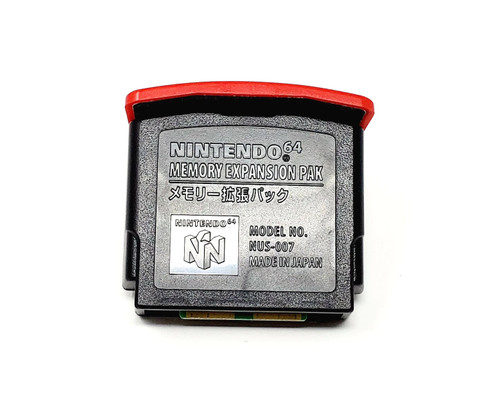
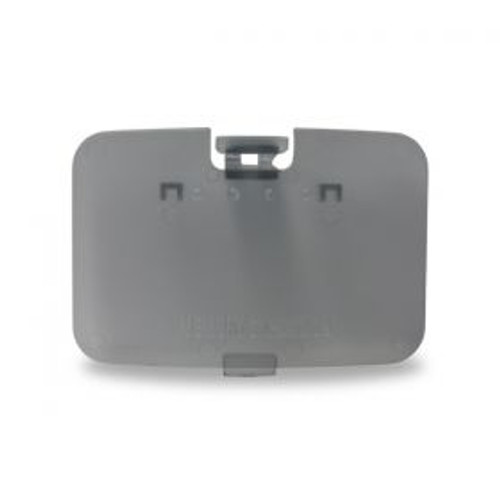
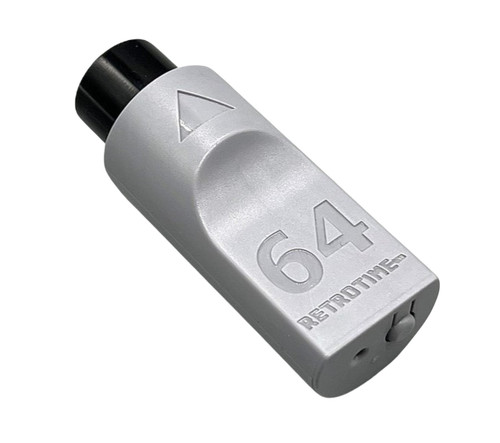
RetroTime N64 BlueRetro with Memory Pak for Nintendo 64

$34.99
(19 reviews) Write a Review
WIN $300 FOR WRITING A REVIEW! LEARN MORE
SKU:
SAGN64BLURADP
RetroTime N64 BlueRetro with Memory Pak for Nintendo 64

ABOUT THIS PRODUCT


Did you ever want to play your Nintendo 64 games with a wireless controller, but couldn't find a viable solution? You don't need to wait any longer!

The N64 BlueRetro Controller Adapter is an adapter for the Nintendo 64 that allows you to connect bluetooth controllers like the PS4, PS5, XBOX, Nintendo Switch, RetroFighters Brawler 64 BT (incompatible at the time of writing, but RetroFighters are working on adding compatibility via a firmware update) and most other BT based controllers. Even the Nintendo Switch Online Nintendo 64 Controller works!

Not only that, but it also adds 4 banks of virtual memory packs for your saves, that you can download and backup through its web interface! It can also emulate a rumble pack, if your controller supports rumble!

Features:

  • Remappable buttons

  • Easy to use web interface

  • Over the Air firmware updates

  • Plug & Play

  • Rumble and memory pack support (virtual)

Pairing Process:

  • Plug the adapter into your Nintendo 64 console.

  • The LED will start to flash, this indicates pairing mode is active.

  • Pair the controller of your choice

  • After the controller is paired, it will automatically connect after a button press from now on

Button functions:

Short press (outside BT inquiry mode): Disconnect all Bluetooth devices from the adapter. Short press (BT inquiry mode): Cancel Bluetooth pairing mode. 3 second hold: Enable Bluetooth pairing mode (new pairing). 10 sec hold: Factory resets the adapter to default configuration and clears BT pairing keys.

LED Status:

Solid: An error occurred, try shutting off your console and re-plug the adapter. Pulsing: Bluetooth pairing mode active (pairing). Off: No errors, Bluetooth pairing mode disabled, controller connected.

Web Config Information:

Web Config is only available if no controller is connected and is supported only in Desktop or Android Chrome.

How to access the Web Config:

Power on system and connect via Web Bluetooth at BlueRetro Config to configure adapter. Button remapping and preset instructions can be found here.

Updating firmware via Web Config (OTA FW update):

Download the latest firmware from the BlueRetro GitHub page. Unzip the firmware file. Open a tab/window in your web browser and navigate to BlueRetro Update; then click “Connect BlueRetro” button. Select the “BlueRetro_n64_spiffs.bin” from the unzipped firmware folder. The “Live Output” will scroll through with the update process. On a PC, the update can take around 5 minutes. On Android, the update can take significantly longer.

Additional Information

Depending on the state of your Nintendo 64 Power Supply, it may have a hard time to power 4 adapters simultaneously. In our tests with four adapters on one system, everything worked out fine, but be aware that it could cause problems if your power supply is not in a good state.


This adapter is made possible by the amazing Blueretro publicly available project by Darthcloud: GitHub

Videos

19 Reviews

  • 5
    Works great

    Posted by Brandon Peters on Nov 28th 2025

    This worked perfectly. I just plugged it in, synced it with my 8bitdo upgraded N64 controller, and it was good-to-go.

  • 5
    Tight Fit, but GREAT Function

    Posted by Snow Jackson on Nov 13th 2025

    This thing connects easily and with zero detectable lag, even through a RAD2X and MClassic. I'm using my NSO N64 controller and it's awesome. The only thing is you need to do some extra legwork for the memory card feature to work, but that's not too big a deal. Overall, worth it and you should order sooner rather than later, due to stock issues and tariff issues.

  • 5
    Worked Perfectly Right Out of the Box

    Posted by Tifa on Apr 12th 2025

    I got the watermelon red version. The color was beautiful and, more importantly, it worked perfectly right out of the box. I paired it with a Dualshock 4 controller. The right stick filled in for the C buttons and everything else mapped out intuitivelly. Vibration and save function work perfectly. Shadow Man for the N64 asked if I wanted it to fix the formating on the `save card` and when I selected `yes` it said it was successful. I could save after that without having to use the website. I`ll definitely be buying more of these for multiplayer!

  • 5
    Flawless

    Posted by Scypio18 on Apr 5th 2025

    Works perfect with NSO controller on original hardware. Syncing only took a few seconds and reconnects almost instantly. No noticable lag. So glad i finally picked this up.

  • 5
    Switch Online Controller

    Posted by Dustin on Feb 24th 2025

    Bought this to connect my switch online controller to my original N64. It works flawlessly. You must format the Control Paks before the system will recognize them. You can do this on PC or some Nintendo titles allow you to do it right from the game screen.

  • 4
    retrotime bluetooth

    Posted by Tom C. on Dec 10th 2024

    What a super cool device. The ability to use any Bluetooth controller really gives you endless options to play in comfort.

  • 5
    Say by to cords

    Posted by Spencer on Nov 28th 2024

    This worked great with my NSO N64 controller, and was very easy to set up. The support for rumble and virtual memory paks means you can effectively leave the cords behind my while still getting the complete N64 experience outside of possible transfer pak use.

  • 3
    Good accessory, but some compatibility problems

    Posted by Thomas on Nov 7th 2024

    It`s great to have a bluetooth connector for the N64! One major issue I have with it though is that it does not seamlessly connect to the 8BitDo bluetooth upgrade kit. I was specifically hoping to connect an original N64 wirelessly through this, but it not every button maps correctly when doing so (A and B are swapped) and so additional editing has to be done within the receiver`s interface. I`m not sure if this is the fault of Blueretro or 8BitDo, but there aren`t many other bluetooth options for an actual N64 controller, so it`s disappointing this connection isn`t as easy as it should be.

  • 5
    Very Responsive!

    Posted by Angel Sanchez on Aug 15th 2024

    Connection was very easy, controller is extremely responsive, and overall just a very easy way to connect any bluetooth controller! Great purchase for anyone wanting a quick and easy way to connect a modern controller for this retro console.