

null

xStation PlayStation ODE [FREE 64GB SD CARD!]

$119.99
(44 reviews) Write a Review
WIN $300 FOR WRITING A REVIEW! LEARN MORE
SKU:
SAG035051[RR-4A]
xStation PlayStation ODE [FREE 64GB SD CARD!]


HOLIDAY DEAL! FREE 64GB SD CARD!


Mod Level: Expert

WARNING: We consider this an Expert Level upgrade for the PlayStation. Meaning only those with some significant experience should attempt this upgrade. Neither Stone Age Gamer or the manufacturer will warranty upgrades that are not done properly. If you do not feel comfortable installing the xStation in the PlayStation yourself we highly suggest either using an approved service tech (we offer this service for $69.99) or bundle the xStation and install service together HERE.

Dead laser or just want to keep your collection on the shelf? Play your whole library of personally backed-up PS1 games from microSDs. The xStation allows you to load your personally backed-up games from a microSD card, put the microSD card into the xStation and have the list of your games at your finger tips. Please read the FLASH / ODE CART DISCLAIMER below before purchasing.

What's included:

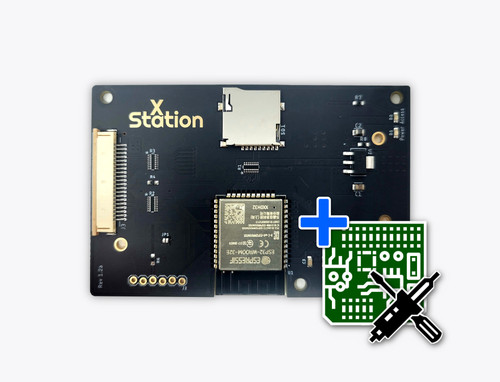
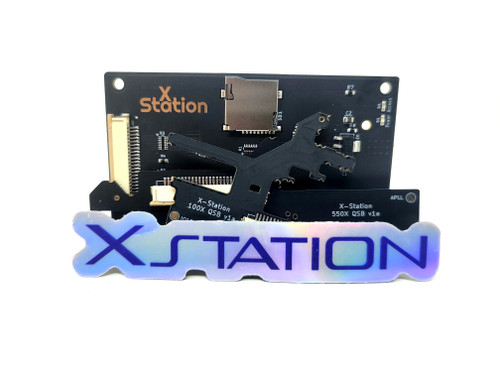
  • xStation Main PCB
  • xStation 550X Quick Solder Board v1a
  • xStation 100X Quick Solder Board v1a
  • 3 x plastic standoffs
  • 2 x xStation Stickers

Features:

  • Full compatibility with the PlayStation 1 library.
  • Supports multi-CD games and easy switching
  • Return to loader by holding the reset button for 1 second
  • PS1Digital compatibility and IGR support via PS1Digital's OSD menu
  • microSD cards of any size are supported
  • Supports ExFAT and FAT32
  • Automatic 50/60Hz switching
  • Load times are slightly faster than an original drive in good condition
  • Easy firmware updates - just copy it to the SD card - done!
  • No registration required for updates, you can also downgrade without any problems

Compatibility:

The xStation can be installed into these original PlayStation series of consoles:

  • SCPH-100x
  • SCPH-3xxx
  • SCPH-5xxx

This xStation comes with both a PU-8 and PU-18 PCB, which will make it compatible with the models below.

100X Quick Solder Board v1a (PU-8) Compatibility:

  • Most SCPH-1001*
  • Most SCPH-1002*
  • Most SCPH-3000*
  • Most SCPH-3500*
  • All SCPH-5000

* Some of the PlayStation models use an early version of the PU-8, which unfortunately is not compatible. To determine which PU-8 version you have you must open up your PS1 and look for the number on the board. An early version would be X-XXX-XXX-11, and would be incompatible. If there is another number instead of 11 ast the end (21, 22, 23 or 41) it is compatible (the X's are also numbers, they are just not relevant).

550X Quick Solder Board v1a (PU-18) Compatibility:

  • All SCPH-5001
  • All SCPH-5500
  • All SCPH-5501
  • All SCPH-5502
  • All SCPH-5503
  • All SCPH-5552

A nice overview of the different models and motherboards can be found in this wiki.

More information as well as detailed installation instructions can be found in the official wiki.


FLASH CART / ODE DISCLAIMER

A) PIRACY – Stone Age Gamer Retroworks, Inc. ("Stone Age Gamer") does not support or condone piracy. Flash carts, ODEs, and similar devices Stone Age Gamer sells and supports are intended to be used only for the following purposes: development, playing games licensed by Stone Age Gamer for use with the product, and/or playing currently owned personally backed-up games and media where it is legal to do so. Stone Age Gamer does not offer support for any other use of this product.

B) PERSONAL BACK-UPS – In many territories it is legal to make back-ups for personal use and/or archival purposes, however it may not be legal in all territories. Please learn the national and local laws regarding this subject before making back-ups for personal use. Please note, in most territories "Personal Back-up" means exactly that; back-ups you made yourself of games you currently own. This often does not include back-ups obtained via other methods (i.e. downloading), even if it is a game you physically own.

C) DAMAGE – Neither Stone Age Gamer or the manufacturer is responsible for any damage of property this product may cause. This is a new product intended to be used on electronic hardware that exceeds two decades in age and Stone Age Gamer can’t guarantee the condition of such hardware. USE AT YOUR OWN RISK.

D) ALTERATION & USE – Any unauthorized alteration and/or non-intended use of this or any other flash cart product sold by Stone Age Gamer shall void both manufacturer and retailer warranties of that product.

E) CLONE / UPGRADED CONSOLES – Flash carts / ODEs were developed and intended to be used on unchanged original hardware using original hardware accessories. Stone Age Gamer does not guarantee flash cart / ODE operation on clone consoles or altered consoles. Flash carts / ODEs may operate on some clone consoles or altered consoles. However, due to power consumption changes, random hardware changes and/or firmware updates of those consoles we cannot offer a guarantee of flash cart compatibility. Any returns due to incompatibility with clone consoles or altered consoles will result in no refund of any shipping costs and a 10% restocking fee if no defect is found during testing.

44 Reviews

  • 5
    Great mob

    Posted by Daniel on Nov 19th 2025

    Compared the XStation to the MODE. I definitely think I made the right choice. For someone who has a lot of experience soldering, the install was straightforward and simple. It's run any game I've thrown at is so far with no problems. I wish it would come with a cover, but I understand since no one is going to see it once it's installed and set up. Once installed, software setup is easy and use afterwards is simple. Definitely recommend this upgrade.

  • 5
    Fantastic Hardware

    Posted by Ethan B on Sep 3rd 2025

    The xStation is incredible. The install is pretty involved, but anyone who is handy with the soldering iron should be able to handle it. High compatibility and indistinguishable from the optical disks once it`s running!

  • 5
    Excellent ODE with great instructions

    Posted by Peter G on Jul 28th 2025

    I have only been soldering for one year, but I found the installation of this ODE to be very straightforward to execute. The chip works great and plays all of my self-dumped games without any issues. Combined with a Memcard Pro, playing my favorite PS1 games couldn't be easier.

  • 5
    xStation Brings Life to my Old Playstation

    Posted by Sean Benson on Jul 7th 2025

    TL;DR: The xStation has turned my old PS1 into the best way to play Playstation games.

    I have been revisiting some of the classic video games I played as a child, and after playing with replicators for a bit, I felt the urge to play using real hardware. After some research, I came across the xStation and knew this was the top-of-the-line upgrade for my needs.

    Regarding installation: I have never soldered before, but I borrowed my friends soldering iron, got him to give me a quick tutorial, and spent the next two weekends practicing on practice kits I purchased online. With a little luck, I was able to install the xStation successfully on the first try, and I learned a lot in the process. It`s hard, but if you take your time and have the right tools, it`s mangagble for an ambitious beginner.

    No complaints!

  • 5
    Xstation is the upgrade your PS needs.

    Posted by Marius on Jun 27th 2025

    Dug out my SCPH-1001 I bought in 96 wanting to play some games and quickly realized my optical drive was failing.

    After trying to source a legit optical drive replacement and getting burned with Chinese knockoffs that do not even work, I gave the Xstation a try and could not be happier.

    Easy 30 minute install and easy operation.

  • 5
    Best ODE for the PS1

    Posted by Thomas on Jun 23rd 2025

    The developer absolutely nailed this device! The other options out there are either far too expensive for the same features or are flat out buggy. The X-Station simply just works. If you are on the fence debating which ODE to get, grab the X-Station!

  • 4
    Almost perfect, minor audio/FMV hiccups

    Posted by John SNEED on Jun 15th 2025

    Install was a bit tricky. I actually prefer the old upgrade, spaghetti mess of wires style of mods to these nu-mods with quick solder boards with castellated pads. It can be hard to tell if you've actually made a solid connection to the board, or if you just managed to get solder on the castellated pad only. I had to go back and check with a multimeter after my first try didn't work, and found a few open circuits I had to correct. After this it worked great. (SCPH-5501, PU-18 mobo)

    The reason I'm giving it four stars instead of five is because there is still occasional stuttering from streamed audio or FMVs. Do a quick search for “xstation audio stuttering” to see what I'm talking about. It seems to manifest as a short, ~50ms gap in audio & video about once every 2000 ms.

    My understanding from reading the docs and Discord is that the ESP32 that's at the heart of this is pretty dumb, and doesn't have the RAM to buffer the whole disk in RAM (not even close). The ESP32 is constantly, constantly pulling a tiny stream of data (4k blocks, 1 block at a time?) and if the SD card is doing something at the time (like internal flash management of a weak sector), you'll get a little stutter as the card finishes what it's doing before serving the read.

    It does seem correlated to flash management, as the first day after you write the card, the blocks are all fresh, the card doesn't need to move any blocks around, and the device seems to perform perfectly. Then after 2-3 months, stutters gradually start creeping in. Rewriting the card will again fix it (fresh blocks), until the problem creeps back in.

    I'm looking into ways to mitigate this - pulling the card, forcing a read of all sectors with a dd to /dev/null seems to give the card a chance to detect and fix weak sectors without interrupting play, but it's still too early to say if this is a real fix. I've ordered the exact card the dev recommends in the meantime to see if it helps, but I'm already using a high quality card.

    So there's my warning. It's a million times better than a dead OEM optical, but the experience in game isn't as good and set-and-forget as my Rhea ODE for Saturn or my Everdrives for cartridge systems.

  • 5
    Xstation

    Posted by Hussam Saad on May 22nd 2025

    Amazing, access to your ps1 games never been this convenient.

  • 5
    Amazing product, tricky install.

    Posted by Bryan on Apr 22nd 2025

    It goes without saying that this is a truly incredible product, especially for the price. Compared to other ODE options, this is an absolute steal, and it works flawlessly, and is truly amazing. Really a must have if you`re a Playstation fan.

    The install is genuinely difficult. I installed mine just fine and it works great, but I do want to give a warning about the difficulty.

    If you`re anything less than very experienced, you should just go with the install included option. You need a soldering microscope to do this install right. The components involved are very small, they`re very close to together, and often you`re trying to keep a tiny amount of solder confined to a tiny area. It`s doable if you have the experience, but seriously don`t try this if you`re a beginner.

    I would consider myself very experienced, and I was able to install it, but it was difficult. I did mine once, put it all back together, got a black screen the first time, went back and fixed a place where something was shorted, and another place where something wasn`t connected, after that it worked. I also very nearly shorted a tiny surface mount resistor just because it was so close to something else I was working on. It is very easy to accidentally short things on the PS1 because everything is so close together. Even if you`re careful, you could accidentally lift components you don`t mean to, or short things.

    I mention this because I have a ton of experience and I still had to go back and redo some work. I got it working second try, it wasn`t that bad overall, it wasn`t a nightmare or anything, it didn`t take that much time, but you really need to have a lot of skill to install this. It was difficult as someone with a lot of experience. If you have a microscope for soldering, go ahead and order it, otherwise just pay the extra money for the install option.

    Either way, this device is amazing and absolutely worth it. A real must have in any collection.