


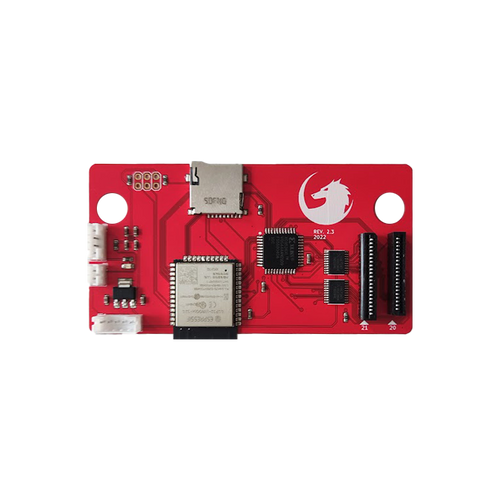

With the Fenrir Duo, you'll never use your old cd drive. Simply replace it with the Fenrir by removing the disk drive and plug both Fenrir cables. No soldering required.
You will be able to store all your games in the microSD, launch homebrews and games and load them faster from the menu.
Features
- Improved loading time with the SD card.
- Support any microSD (and SDCard with an extender) of any size.
- Easy to add games with the microSD.
- Support .ccd/.iso/.bin and redump rips.
- Support FAT32 and exFAT
- All locations!
- Supports the Sega Saturn Movie Card !
Installation
https://www.fenrir-ode.fr/installation/
The installation is very easy, there is no soldering to do, the kit is ready to use.
- Fenrir Duo supports up to 2499 games per SD card.
- IGR to return to the menu.
- Press ABC + Start on your controller to return to the menu.
Grab the latest firmware here: https://www.fenrir-ode.fr/firmware/#lastest-version
How do I know if I have a 20 or 21 pin Console?
20 pin drives are motherboard revisions VA0, VA0.5, VA0.8, VA1.
Please note some VA1 revisions come with a 21 pin drive instead of a 20 pin drive.
In order to find out if your console has a 20 pin drive without opening it, you can look for a screw at the back, next to the power supply socket.
If you see 3 screws, then it’s a 20 pin VA0. If not, then you need to check that the power and reset buttons are oval in shape and not round.
Another way to check, is to open the CD lid and look towards the back of the cd mechanism, to the gap on its right side.
If you see a white ribbon cable running towards the back, then you have a 20 pin drive.
If none of the above helps, then you most likely have a VA1 console and you need to open it to make sure your drive uses a 20 pin ribbon.
How to update the firmware
Updating your Fenrir Duo's board’s Firmware, is incredibly easy.Tools Required:
- A microSD card, FAT32 formatted
- A computer (Windows, OS X or Linux) with a microSD or SD card slot with adapter
- The latest Firmware Update.bin file, which you can download from here
1. Insert your microSD card to your computer’s card reader. The drive will show up on your Computer (Windows) or the Desktop (OS X).
2. Open it with Windows Explorer / Finder / File Browser.
3. Drag the “update.bin” file to your SD card.
4. Safely eject the card.
5. Make sure your Sega Saturn is turned off. Insert your microSD card to the Fenrir Duo microSD card slot.
6. Turn on your Sega Saturn. The animation won’t play. After a while, you will see the Saturn Bios screen.
7. Select “Start Application”. The firmware update is done!
FLASH CART / ODE DISCLAIMER
A) PIRACY – Stone Age Gamer Retroworks, Inc. ("Stone Age Gamer") does not support or condone piracy. Flash carts, ODEs, and similar devices Stone Age Gamer sells and supports are intended to be used only for the following purposes: development, playing games licensed by Stone Age Gamer for use with the product, and/or playing currently owned personally backed-up games and media where it is legal to do so. Stone Age Gamer does not offer support for any other use of this product.
B) PERSONAL BACK-UPS – In many territories it is legal to make back-ups for personal use and/or archival purposes, however it may not be legal in all territories. Please learn the national and local laws regarding this subject before making back-ups for personal use. Please note, in most territories "Personal Back-up" means exactly that; back-ups you made yourself of games you currently own. This often does not include back-ups obtained via other methods (i.e. downloading), even if it is a game you physically own.
C) DAMAGE – Neither Stone Age Gamer or the manufacturer is responsible for any damage of property this product may cause. This is a new product intended to be used on electronic hardware that exceeds two decades in age and Stone Age Gamer can’t guarantee the condition of such hardware. USE AT YOUR OWN RISK.
D) ALTERATION & USE – Any unauthorized alteration and/or non-intended use of this or any other flash cart product sold by Stone Age Gamer shall void both manufacturer and retailer warranties of that product.
E) CLONE / UPGRADED CONSOLES – Flash carts / ODEs were developed and intended to be used on unchanged original hardware using original hardware accessories. Stone Age Gamer does not guarantee flash cart / ODE operation on clone consoles or altered consoles. Flash carts / ODEs may operate on some clone consoles or altered consoles. However, due to power consumption changes, random hardware changes and/or firmware updates of those consoles we cannot offer a guarantee of flash cart compatibility. Any returns due to incompatibility with clone consoles or altered consoles will result in no refund of any shipping costs and a 10% restocking fee if no defect is found during testing.